
XCORE / ADMINISTRATION / CONNECTED CAPABILITIES

Administration Software
A connected way forward.

People, planning, financial records, support, and internal management capabilities for a connected organization.

UNDERSTAND THE CONNECTION

Support the people and decisions behind the business.

Administration connects the internal responsibilities that allow an organization to work coherently. XCORE’s catalogue brings people, planning, expenses, invoices, support, learning, purchasing, and management information into a shared architecture while keeping their different access and approval needs clear.

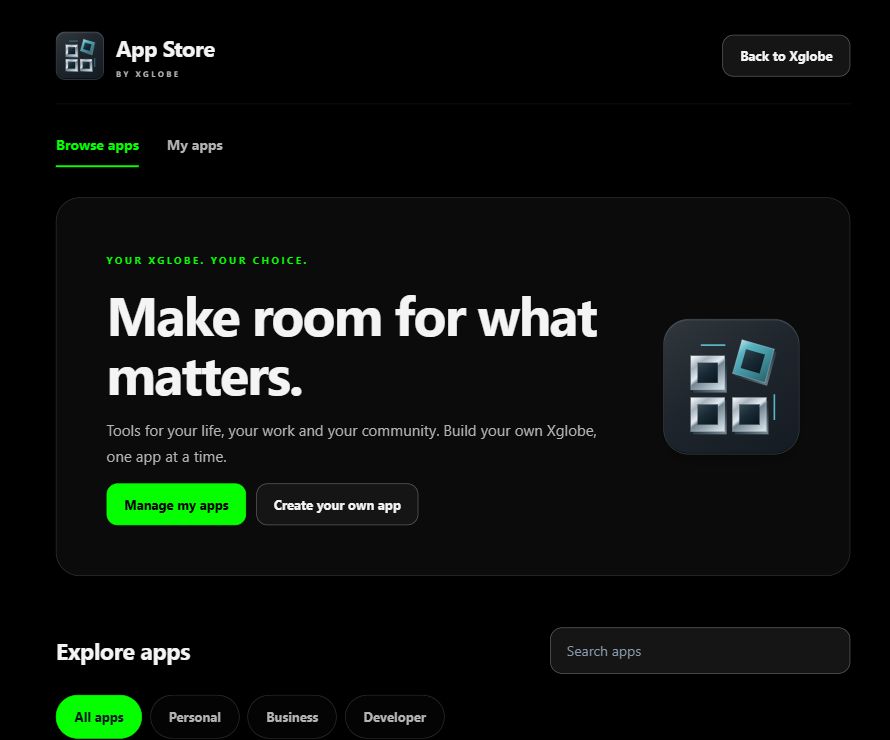
Actual XGlobe App Store with personal, business, and developer app categories.
Inside the shared platform · actual App Store capture, November 2, 2026. This shows the platform catalogue, not a screenshot of every listed product.
THE PURPOSE IN PRACTICE

People, planning, financial records, support, and internal management capabilities for a connected organization.

The mission behind the work

Connect records without erasing responsibility

An illustrative new employee process may connect a role, approved start date, equipment request, account setup, learning path, and manager. Those records support the same person but do not all belong to the same owner or audience. A team may need to know availability while compensation and private personnel details remain restricted.

The same distinction applies to financial work. An expense submission, approval, accounting entry, reimbursement, invoice, and payment are different events. Connecting them can reduce repetition, but a shared interface should not imply that one approval completed every downstream obligation. The profiles describe those boundaries so a business can scope its actual operating process.

Build controls around understandable work

Start with who enters information, who reviews it, who can authorize an action, and what evidence the next person needs. Define exceptions and corrections as carefully as the normal path. People should be able to see whether a record is a draft, a request, an approval, or a completed result.

Professional services and regulated responsibilities remain with the appropriate responsible parties. Payroll, accounting, payment, employment, and external-provider arrangements require their own review. XCORE’s capability direction does not by itself establish professional authority, automated filings, merchant approval, or a production connection to every administrative system.

BUILT AROUND THE REAL WORK

Keep the business organized.

Administrative systems make responsibilities, records, schedules, and supporting work visible. Choose the people and financial workflows that fit the business, then define approvals, permissions, reporting, and the integrations they require.

EXPLORE THE CAPABILITIES

Go deeper into Administration Software.

XCORE ADMINISTRATION

Accounting

Organize income, receipts, bills, expenses, bank information, job costs, inventory context, and invoicing requirements.

Explore Accounting
XCORE ADMINISTRATION

Administrative business intelligence

Consolidate operational information into reports, dashboards, and analytical views for organizational decisions.

Explore Administrative business intelligence
XCORE ADMINISTRATION

Creative commissions

Discover creative talent, define a brief, collaborate with artists or freelancers, and organize the delivery of commissioned work.

Explore Creative commissions
XCORE ADMINISTRATION

E-training

Design professional, corporate, and academic learning programs with tailored paths, interactive activities, and flexible delivery.

Explore E-training
XCORE ADMINISTRATION

Employee management

Connect workforce administration, recruitment, payroll context, performance, development, and wellbeing across the employee lifecycle.

Explore Employee management
XCORE ADMINISTRATION

Expense management

Track spending, route approvals, apply company policies, and prepare reports with accounting and ERP integration in scope.

Explore Expense management
XCORE ADMINISTRATION

Help desk and user support

Support setup, navigation, troubleshooting, billing questions, privacy information, and feedback.

Explore Help desk and user support
XCORE ADMINISTRATION

Invoicing

Prepare invoices, recurring schedules, reminders, status views, history, and reports with accounting integration in scope.

Explore Invoicing
XCORE ADMINISTRATION

Payroll

Scope wages, deductions, employee self-service, payroll records, and connections to qualified payroll and tax processes.

Explore Payroll
XCORE ADMINISTRATION

Planning

Organize projects, events, schedules, and shared plans through templates, tasks, calendar connections, and progress views.

Explore Planning
XCORE ADMINISTRATION

Point of sale

Define a sales workspace with inventory, loyalty, system integration, and performance reporting requirements.

Explore Point of sale
XCORE ADMINISTRATION

Purchasing and product discovery

Explore product discovery and purchasing journeys across home, electronics, fashion, wellness, outdoor products, and toys.

Explore Purchasing and product discovery
XCORE ADMINISTRATION

Recruiting and staffing

Define hiring needs and coordinate sourcing, screening, interviews, placement, and contract-staffing requirements.

Explore Recruiting and staffing
XCORE ADMINISTRATION

Time off

Organize leave requests, balances, approvals, policies, and employee notifications.

Explore Time off
XCORE ADMINISTRATION

Time sheets

Record billable work or attendance, route timesheets for review, and report time and project costs.

Explore Time sheets
PLAN YOUR IMPLEMENTATION

Match the scope to your needs.

Choose the business tools your organization needs. Our team can confirm the app, access, connections and setup for your company before implementation.

PART OF THE LARGER SYSTEM

Make the next connection.

QUESTIONS & ANSWERS

A clearer picture.

The details that help you choose your next step.

Is the catalogue a complete deployed HR and finance suite?

These pages introduce ways to organize business administration. Contact our team to choose the tools, access and setup that fit your organization.

Why separate employee self-service from administrative approval?

A person can usefully view information or request a change without being authorized to alter protected settings. Clear stages help employees understand the process and preserve responsibility for decisions affecting pay, access, or commercial records.

Can administrative tools reduce duplicate entry?

They can when identifiers, field meanings, source ownership, and integrations are agreed and tested. Copying the same record between tools without reconciliation may simply reproduce inconsistencies more quickly.

How does training fit into administration?

Training supports onboarding, role changes, and practical capability. A learning path should connect to the work a person needs to do, with clear content ownership and appropriate assessment rather than an unexplained completion badge.

What belongs in an initial administrative-systems discussion?

Describe the people and financial workflows, current systems, approval roles, common errors, and the decisions that are difficult to trace. Use nonconfidential examples until the appropriate access and professional arrangements are in place.

THE PEOPLE’S CORPORATION

A future
for people.

Personal control. Human opportunity.
Stronger local economies and a voice for communities.

Join XGlobeExplore the mission
SEARCH THE WHOLE ECOSYSTEM Press Esc to close
FIND THE RIGHT FIT

Your products, side by side.