
XCORE / ERP & APPLICATIONS / CONNECTED CAPABILITIES

The business software direction.
Function by function.

Explore marketing, operations, administration, and data capability profiles within the XCORE Business Systems / ERP direction.

UNDERSTAND THE CONNECTION

Understand the work before choosing the system.

The XCORE Business Software Catalogue maps organizational needs across marketing, operations, administration and data. It explains what each function involves and the connections worth considering. These profiles help a business describe its requirements; they are distinct from a verified deployment in a particular account.

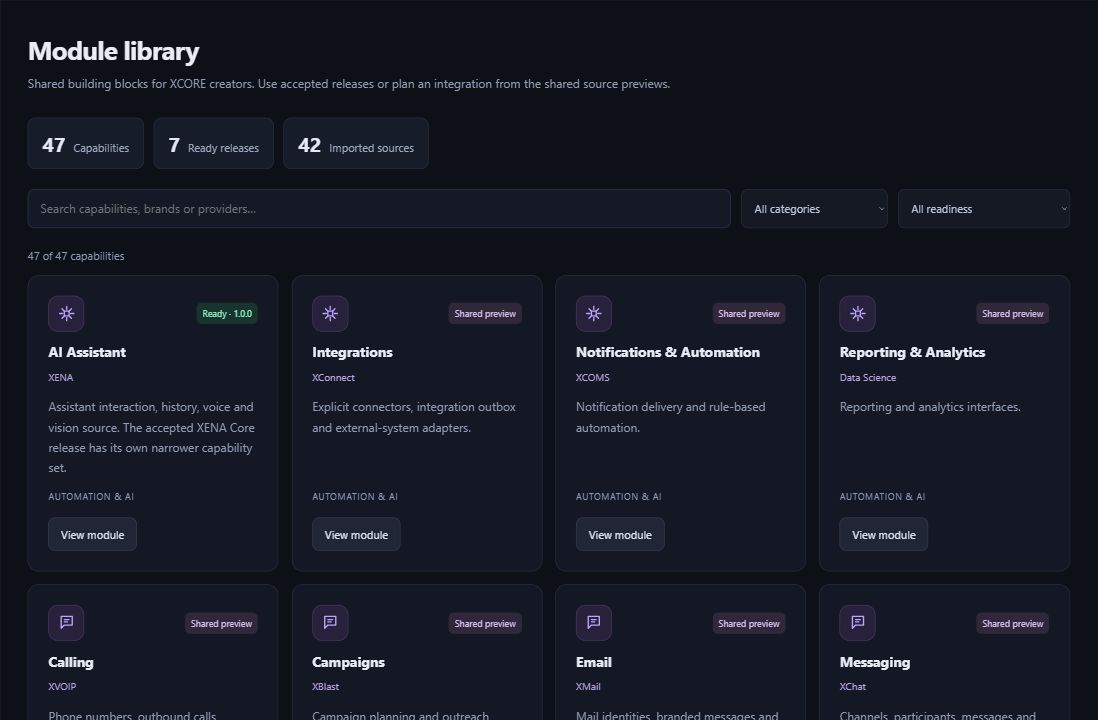
Actual XCORE Creator Studio module library showing ready releases and shared source previews.
Inside the creation layer · actual XCORE module-library capture, November 2, 2026. Release labels and account permissions apply.
THE PURPOSE IN PRACTICE

Explore marketing, operations, administration, and data capability profiles within the XCORE Business Systems / ERP direction.

The mission behind the work

Four perspectives on the same organization

Marketing connects discovery, communication, campaigns and customer engagement. Operations follows customers, work, documents, inventory, assets and delivery. Administration addresses people, schedules, financial records and support. Data brings the resulting information together for querying, reporting and controlled sharing.

A customer inquiry may begin with a campaign, become an operating record, require an appointment and eventually appear in reporting. The important question is how each handoff works: which record is authoritative, who is responsible and what information the next person needs. Selecting separate tools without those decisions can preserve the fragmentation XGlobe aims to reduce.

Choose the tools for the way you work

Use a profile to describe the process, the current difficulty and the outcome you need. A scoped engagement can then address user roles, data mapping, migration, interfaces, training and acceptance. Confirm the configuration and release of each component instead of treating every item in a broad software catalogue as an installed feature.

Creator Studio, Marketplace and Business Systems belong to the same XCORE layer but have different jobs. A creator can use Studio to shape a focused app. A business can use these function profiles to prepare a wider implementation discussion. Business Services connects the technology to organizational responsibilities and adoption.

BUILT AROUND THE REAL WORK

Every function has a place.

The business software and operational architecture connecting marketing, operations, administration, data, and industry workflows.

Explore tools for the work your business does. Creator Studio helps you build apps, while the Marketplace helps you find reusable tools. Contact our team to discuss the setup and connections your company needs.

WHAT THIS CONNECTS

A clearer view of the work.

01

Marketing

Connect discovery, communication, customer engagement, and measurable campaigns.

02

Operations

Organize customer relationships, projects, fieldwork, assets, documents, and delivery.

03

Administration

Connect people, schedules, financial records, support, and management workflows.

04

Data & intelligence

Bring information together, explore it, and control how it is shared and understood.

EXPLORE THE CAPABILITIES

Go deeper into XCORE Business Software Catalogue.

PLAN YOUR IMPLEMENTATION

Match the scope to your needs.

Choose the business tools your organization needs. Our team can confirm the app, access, connections and setup for your company before implementation.

PART OF THE LARGER SYSTEM

Make the next connection.

QUESTIONS & ANSWERS

A clearer picture.

The details that help you choose your next step.

Is every capability listed here already deployed?

These pages introduce business tools and ways to use them. The apps, access and connected services included for your organization are confirmed during setup.

Where should a small business begin?

Choose one recurring problem with a clear owner, such as missed customer follow-up or a difficult project handoff. Follow that workflow across the relevant pages, then describe the people, records and current systems in a Business Services inquiry.

How do the data pages relate to the operating tools?

Data pages cover questions such as connections, models, queries, dashboards and permissions. They explain how information can be organized and understood around the work. The actual source systems and authorization must be established for an implementation.

Can I explore software without requesting consulting?

Yes. Browse the capability families, product profiles and availability roadmap. Use the official app or studio entry when the relevant experience is available to your account. Consulting and implementation remain separate scoped engagements.

THE PEOPLE’S CORPORATION

A future
for people.

Personal control. Human opportunity.
Stronger local economies and a voice for communities.

Join XGlobeExplore the mission
SEARCH THE WHOLE ECOSYSTEM Press Esc to close
FIND THE RIGHT FIT

Your products, side by side.