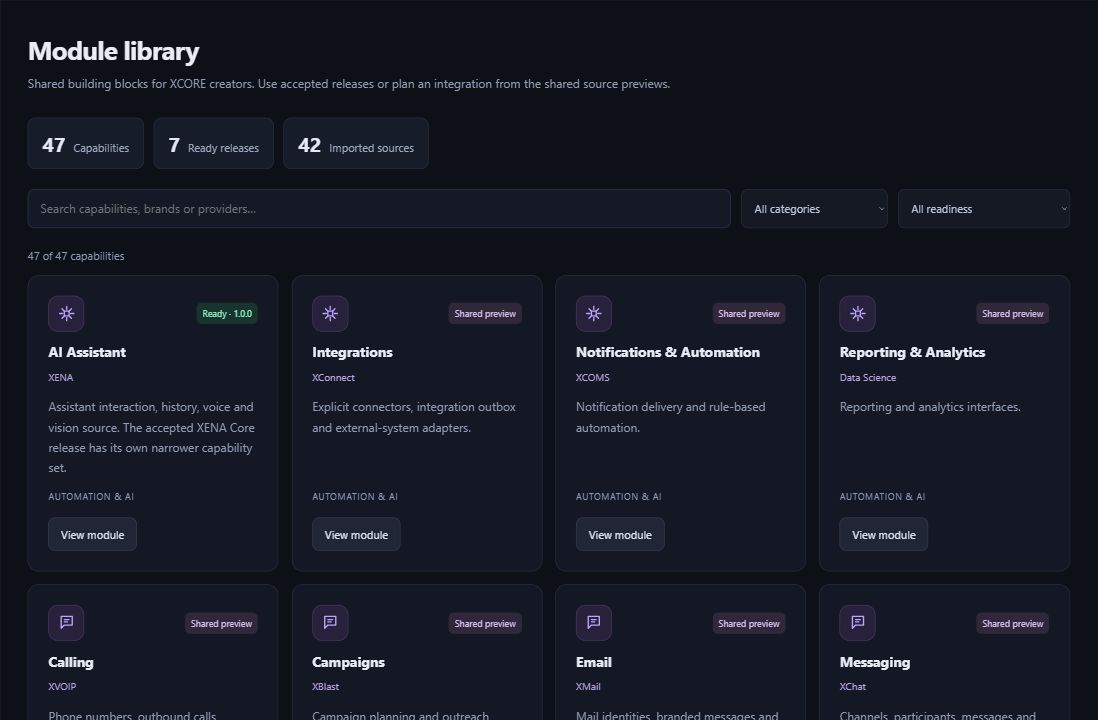
Reusable modules give creators a starting point for common tasks, from communication and administration to operations, creative work and AI. Browse the library, compare tools and follow the setup instructions for your chosen listing.
Inside the creation layer · actual XCORE module-library capture, November 2, 2026. Release labels and account permissions apply.
THE PURPOSE IN PRACTICE
Explore the XCORE module library to find reusable tools and setup information for your app.
Start by identifying a boundary: what information goes into the capability, what should come out and which person uses the result. For a project tracker, a reusable notes or contacts capability may be relevant. That does not mean the project should receive every record or permission from a different application.
Open a listing to review the tool, required services and account access. Some listings provide code for developers to adapt. Follow the installation and setup instructions before using it in your app.
02
Keep ownership of the integration clear
For an organizational project, identify who configures the module, who authorizes its data access and who handles failures or later changes. Decide how a changed interface will be reviewed before it affects people doing live work. These responsibilities matter as much as the initial component selection.
Use Creator Studio to build your project, the Marketplace to discover reusable tools and the connection guide to bring services together. Choose the starting point that fits the work you want to do.
Explore reusable tools in the library. Each listing explains its contents and setup needs. Some tools require developer installation or a connected service before they work inside an app.
01 / MODULE FAMILY
Reach & relationships
Build the path from discovery to a working relationship.
Connect practical knowledge with the work in front of you.
XCADEMYXENATraining / Sales Training
QUESTIONS & ANSWERS
A clearer picture.
The details that help you choose your next step.
Are all module families activated services?+
A family groups tools that do related work. Open an individual listing for features, setup and access details. Adding a tool to one project does not give every company user access to it.
What should I check before selecting a module?+
Compare the tool’s features, setup requirements and access controls with your app’s needs. Decide who will maintain any connections after setup.
How can developers use a code-only listing?+
Authorized developers can inspect and adapt the available code, learn how it works and plan how to use it. Install, configure and test it before people depend on it in an app.
Where do I inspect the actual catalogue?+
Open Creator Studio to browse the module library available to your account. The image shows the catalogue interface; use the app for current listings and setup details.
THE PEOPLE’S CORPORATION
A future for people.
Personal control. Human opportunity. Stronger local economies and a voice for communities.