
XCORE / OPERATIONS / CONNECTED CAPABILITIES

Operations Software
A connected way forward.

Customer, project, document, field-service, asset, inventory, and delivery workflows across the working day.

UNDERSTAND THE CONNECTION

Keep the promise connected to the work.

Operations connects what a customer or organization needs with the people, records, resources, and decisions that deliver it. XCORE’s operations catalogue explains those handoffs across customer relationships, projects, fieldwork, inventory, assets, documents, and production. Its purpose is practical clarity for the team doing the work.

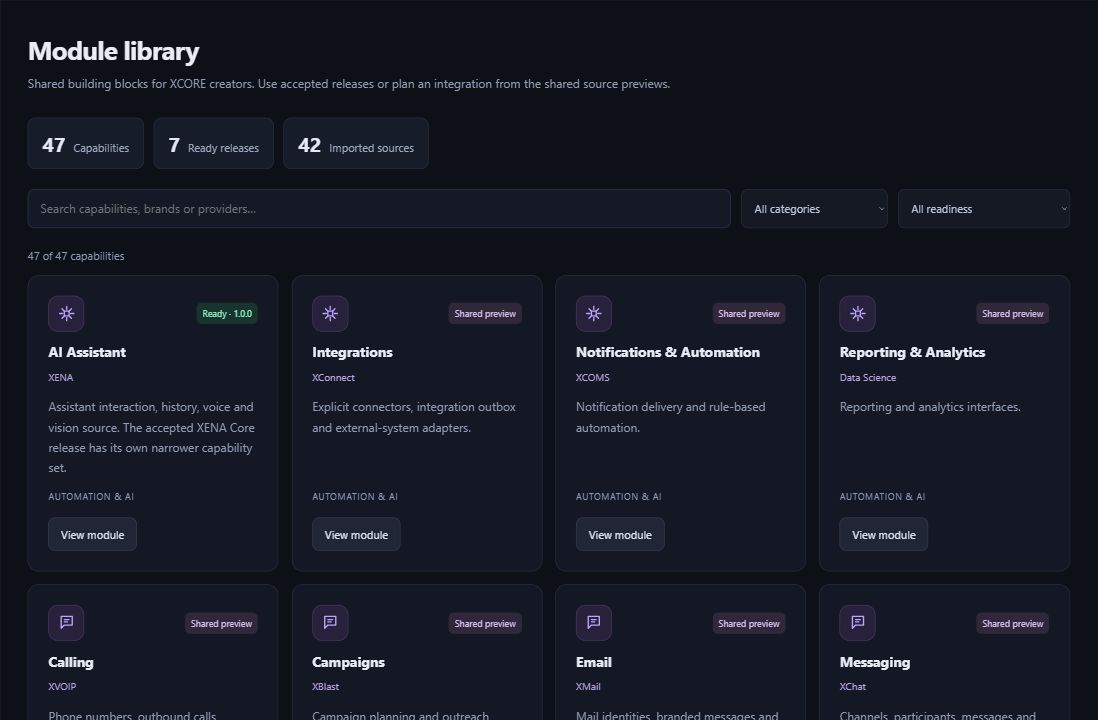
Actual XCORE Creator Studio module library showing ready releases and shared source previews.
Inside the creation layer · actual XCORE module-library capture, November 2, 2026. Release labels and account permissions apply.
THE PURPOSE IN PRACTICE

Customer, project, document, field-service, asset, inventory, and delivery workflows across the working day.

The mission behind the work

Follow the record through the working day

An illustrative service business may begin with an inquiry, prepare an estimate, agree a scope, schedule a visit, assign a work order, record the result, and prepare the commercial follow-up. Each stage has a different meaning and owner. Treating an inquiry as a confirmed job or a task completion as customer acceptance creates confusion even when the software screens look complete.

The operations profiles therefore separate customer records, sales, estimating, projects, tasks, appointments, field service, and work orders. Fleet, maintenance, inventory, and IoT profiles add the physical context. Manufacturing and product-lifecycle profiles address more specialized records and dependencies. A business can use that structure to identify where information is lost or repeated.

Fit the system to the actual handoffs

Start with a representative piece of work and trace what each person receives, changes, approves, and passes on. Identify the authoritative record, important exceptions, and what completion really means. That practical map helps decide which application, integration, service work, or hardware requirement belongs in the project.

An industry-oriented XStack may provide a relevant application direction, while an XPack can combine selected software and services around a business objective. Neither label proves every workflow is deployed. Confirm the actual application scope, permissions, device support, data transition, training, and review before relying on the resulting system.

BUILT AROUND THE REAL WORK

From the first request to finished work.

Connect the customer record to the estimate, schedule, team, documents, assets, and work order. The operational architecture follows the handoffs that make work happen, with different tools and controls for each organization.

EXPLORE THE CAPABILITIES

Go deeper into Operations Software.

XCORE OPERATIONS

Appointments

Improve appointment scheduling and connect bookings with customer records, reminders, and performance review.

Explore Appointments
XCORE OPERATIONS

Customer relationship management

Organize customer information and sales context around the organization, with integration, reporting, and team adoption support.

Explore Customer relationship management
XCORE OPERATIONS

Product documentation

Provide guides, tutorials, API references, FAQs, and troubleshooting material for setup and ongoing use.

Explore Product documentation
XCORE OPERATIONS

Electronic signing

Scope document workflows with signing order, approval rules, connected systems, and reduced paper handling.

Explore Electronic signing
XCORE OPERATIONS

Estimations

Connect resource availability and operational information to project estimation and repeatable workflows.

Explore Estimations
XCORE OPERATIONS

Field service

Coordinate field work through scheduling, dispatch, mobile job information, assets, and customer communication.

Explore Field service
XCORE OPERATIONS

Fleet management

Bring vehicle location, driver activity, maintenance, fuel, and asset information into fleet planning and reporting.

Explore Fleet management
XCORE OPERATIONS

Inventory

Connect stock, order fulfillment, warehouses, and demand analysis to purchasing, production, and sales decisions.

Explore Inventory
XCORE OPERATIONS

Internet of Things

Plan sensors, gateways, connectivity, data analysis, and custom applications for monitoring and operational action.

Explore Internet of Things
XCORE OPERATIONS

Maintenance

Plan preventive checks, repair response, equipment improvements, monitoring, and team training.

Explore Maintenance
XCORE OPERATIONS

Manufacturing Coordination

Plan information and coordination around fabrication, coating, inspection, instrumentation, preassembly, and the wider manufacturing workflow.

Explore Manufacturing Coordination
XCORE OPERATIONS

Media management

Organize media with storage, metadata, distribution, and collaboration requirements.

Explore Media management
XCORE OPERATIONS

Product lifecycle management

Coordinate product information from concept through design, testing, production, distribution, and retirement.

Explore Product lifecycle management
XCORE OPERATIONS

Production line

Connect the planning and information needs around machinery, robotics, prototyping, assembly, and finishing.

Explore Production line
XCORE OPERATIONS

Project management

Organize projects with boards, views, requests, approvals, resource allocation, automation, and progress reporting.

Explore Project management
XCORE OPERATIONS

Sales management

Connect pipelines, forecasts, lead generation, and follow-up to a sales-team workflow.

Explore Sales management
XCORE OPERATIONS

Task management

Organize team and individual tasks with priorities, assignments, shared context, and progress tracking.

Explore Task management
XCORE OPERATIONS

Team discussions

Keep conversations, files, threaded replies, and direct mentions alongside collaborative work.

Explore Team discussions
XCORE OPERATIONS

Work orders

Create, assign, and track maintenance, service requests, and project work with templates, notifications, and asset context.

Explore Work orders
PLAN YOUR IMPLEMENTATION

Match the scope to your needs.

Choose the business tools your organization needs. Our team can confirm the app, access, connections and setup for your company before implementation.

PART OF THE LARGER SYSTEM

Make the next connection.

QUESTIONS & ANSWERS

A clearer picture.

The details that help you choose your next step.

How do operations differ from administration?

Operations focuses on the delivery flow: customers, work, resources, assets, and results. Administration supports the organization through people, planning, financial, and internal processes. Their records often connect, but their responsibilities and approval rules should remain understandable.

Should a business replace all its tools at once?

That is an implementation choice, not an assumption. Mapping the handoffs can reveal a focused integration or staged transition. The appropriate sequence depends on working systems, data, people, constraints, and the risk of interrupting delivery.

Where do XStacks fit?

XStacks bring industry-focused tools to daily business operations. Explore the relevant industry page, then discuss the workflows and support your team needs. A business-tool description does not add a subscription to your account.

Why distinguish task, project, and work order?

A task names an action, a project coordinates a broader outcome, and a work order typically authorizes a defined operational activity. Clear relationships prevent a status in one record from implying completion of work or approvals that did not occur.

What should be prepared for an operations assessment?

Bring a nonconfidential example of how work moves today, the tools involved, recurring handoff problems, and the desired improvement. That is usually more useful for initial scoping than a large unexplained data export.

THE PEOPLE’S CORPORATION

A future
for people.

Personal control. Human opportunity.
Stronger local economies and a voice for communities.

Join XGlobeExplore the mission
SEARCH THE WHOLE ECOSYSTEM Press Esc to close
FIND THE RIGHT FIT

Your products, side by side.