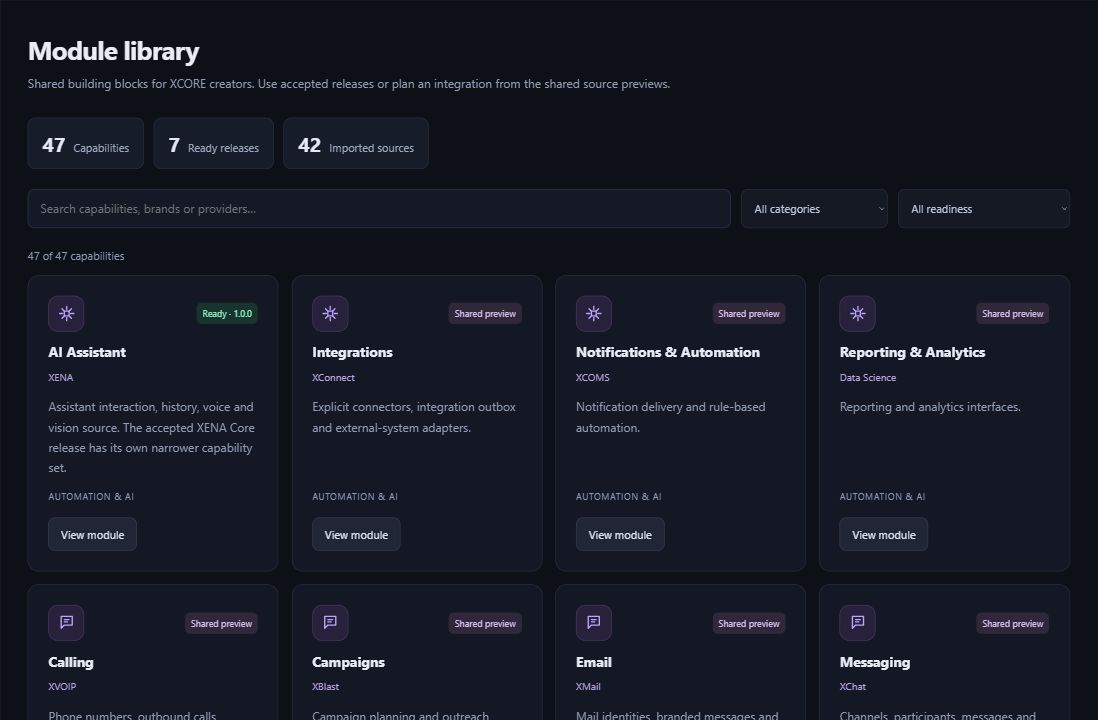
Explore apps, extensions and reusable tools in the XCORE Marketplace. Listings explain what each tool provides and what setup it needs, helping creators choose the right building blocks for their projects.
Inside the creation layer · actual XCORE module-library capture, November 2, 2026. Release labels and account permissions apply.
THE PURPOSE IN PRACTICE
Explore creator apps, extensions and reusable tools, with details about access and setup on each listing.
Browse the library by the task you want to accomplish. Open a listing for the tools it includes, the setup it needs and the access available to your account.
Explore tools for AI assistance, media editing, notes, contacts, expenses, projects and billing. Developers can inspect available code and interface details. Check each listing for its current contents and setup instructions.
02
From discovery to an appropriate integration
Start with the job your app needs to do. Compare the tool’s features, information needs and access controls, then follow its setup instructions. A contact form and a connected customer database may need different setup and ongoing support.
Before planning an app launch, confirm the publishing options, review process and commercial terms available to your project. A Marketplace listing alone does not guarantee public distribution, sales or an audience.
ONE CONNECTED ECOSYSTEM
XCORE Marketplace in your world.
Discover creator applications, extensions and reusable tools for your projects.
A code-only listing lets authorized developers inspect and adapt reusable code. It may need installation, configuration and testing before it works inside an app.
Are the catalogue counts current forever?+
The library changes as tools are added and updated. Browse the current catalogue for the listings and versions available to your account.
Can I publish a paid application to everyone?+
Check the publishing options available to your project. Public distribution, reviews and payment arrangements need to be confirmed before you offer an app to customers.
How is this different from the XGlobe App Store?+
Use the App Store to find apps for everyday life and work. Use the XCORE library when you are building an app and need reusable tools or code.
THE PEOPLE’S CORPORATION
A future for people.
Personal control. Human opportunity. Stronger local economies and a voice for communities.